Showing posts with label Gmail. Show all posts
Showing posts with label Gmail. Show all posts
Saturday, April 13, 2013


Saturday, February 2, 2013
How to Enable / Disable Gmail Desktop Notification
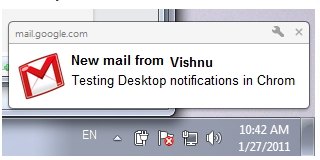
Gmail sends a desktop notifications when you receive a new chat messages or emails. If you enable these notifications, you'll see a pop-up when new messages arrives even if you're not in Gmail window. Here below the tutorial to how to turn on or Turn off Gmail Desktop notification in your Account.
Wednesday, January 9, 2013
கூகுள் மெயில் - சில தேடல் வழிகள்(Search Tips)!!

கூகுள் தரும் ஜிமெயிலில் உள்ள கடிதங்களில், பல வேளைகளில் நாம் சில மெயில்களைத் தேடிப் பெற வேண்டியதிருக்கும்.
குறிப்பிட்ட நபரிடமிருந்து கிடைக்கப்பெற்ற மெயில்கள், குறிப்பிட்ட நபருக்கு அனுப்பப்பட்ட மெயில்கள், சில சொற்கள் அடங்கிய மெயில்கள், சில தலைப்புகளில் வந்த மெயில்கள் எனப் பலவகைகளில் நாம் தேடலை மேற்கொண்டு தகவல் விடைகளைப் பெற முயற்சிப்போம்.
நாம் தேடுகையில் அதற்கான பல வரையறைச் சொற்களைப் பயன்படுத்தி, நம் தேடல்களின் முடிவுகளை விரைவாகப் பெறலாம். அவற்றில் சிலவற்றை இங்கு காணலாம்.
from: குறிப்பிட்ட நபரிடமிருந்து வந்துள்ள மெயில்களை மட்டும் பெற. எ.கா.from: kannan:கண்ணன் என்பவரிடமிருந்து வந்த மெயில்கள் மட்டும் காட்ட.
to:நாம் அனுப்பிய மெயில்களில், குறிப்பிட்ட நபருக்கு அனுப்பப்பட்ட மெயில்களை மட்டும் காட்ட.
எ.கா: to:kannan.கண்ணன் என்பவரிடமிருக்கு (நீங்களோ அல்லது மற்றவர்கள், அந்த மெயிலைப் பயன்படுத்தி) அனுப்பப்பட்ட மெயில்களை மட்டும் காட்ட.
Friday, October 19, 2012
10 best chrome extension for better Gmail experience!!
Gmail Offline beta is a Gmail app built to support offline access, allowing mail to be read, responded to, searched and archived without network access. After first start-up, Gmail Offline will automatically synchronize messages and queued actions anytime Chrome is running and an Internet connection is available.
 To start Offline Gmail after installing, open a new tab in Chrome; In the new tab pane you will see a Gmail Offline Icon. Click on the icon, and Offline Gmail will load.

How to Change your Security Question in Gmail, Yahoo! Mail and Outlook.com accounts!!
Security questions are very important for online accounts to retrieve your password forget accounts (or) stolen accounts. If you have only remember your password but you forget your security question and answer? what will you do after missing mailbox? Here the simple tutorial to know how to change your security questions for famous mail services Gmail, Yahoo! Mail and Outlook.com.
Gmail :

Gmail :
- To change your security question in Gmail click the gear icon in the upper right corner then click Settings.
- Click Accounts and Imports tab then click change password recovery option.
- READ MORE
ஜிமெயிலில் ஐகான்களை Text ஆக மாற்றுவது எப்படி?!!

இன்றைக்கு இணையத்தில் ஜிமெயிலை பயன்படுத்தாதவரே இல்லை எனலாம். நிறைய வசதிகளை தரும் ஜிமெயில், பல மாற்றங்களை செய்து வருகிறது,பல வசதியாய் இருப்பினும் அதில் சில நமக்கு இடைஞ்சலாய் அமையும்.
புதிய தோற்றத்தில் ஒரு மின்னஞ்சலை படிக்கும் போது Tool Bar பகுதியில் Back, Archive, Spam, Delete , போன்றவற்றை ஐகான் வடிவில் கொடுத்துள்ளனர் . கீழே படத்தில் உள்ளது போல.
READ MORE
புதிய தோற்றத்தில் ஒரு மின்னஞ்சலை படிக்கும் போது Tool Bar பகுதியில் Back, Archive, Spam, Delete , போன்றவற்றை ஐகான் வடிவில் கொடுத்துள்ளனர் . கீழே படத்தில் உள்ளது போல.
READ MORE
ஜிமெயிலை தமிழ் மொழியில் பயன்படுத்துவது எப்படி?!!

மின்னஞ்சல் கணக்கு என்பது இணையத்தில் உலவும் அனைவருக்கும் மிக மிக அவசியமான ஒன்று.அதற்கு ஜிமெயில் நமக்கு பெரிதும் உதவுகிறது. இதில் சில நேரங்களில் மொழிப் பிரச்சினை காரணமாக நாம் பலவற்றின் அர்த்தம் தெரியாமல் இருப்போம். அதே ஜிமெயில் முழுவதையும் தமிழில் மாற்ற முடிந்தால்?
இது கொஞ்சம் பழைய வசதி தான் என்றாலும் இதன் பதிவின் இரண்டாம் பகுதி உங்களுக்கு உதவக் கூடும்.
Thursday, October 18, 2012
Save Gmail Messages as PDF without any Extension!!
There are many extension and third party apps available to download Gmail messages as PDF. but are you are using Google Chrome browser you can save all Gmail messages as PDF without using any extension and third party apps.
How to:

How to:
- Sign in to your Gmail account on Chrome browser.
- Open your Gmail message which will have to save as PDF
- Then click the on the Print all icon . see below image
Tuesday, October 16, 2012
Simplest way to find your Google Account Creation Date!!
Do you know when was your Google Account created? Most of them don't know the exact answer but it is very important to know your account creation date. Because if your account will be hacked and unable to get your mobile number and alternate email address Google asks your account creation date to get back.
Here the simple way to know your creation date of your Google Account.
How to:
- Sign in to Gmail with your email id to know creation date
- Then go
Wednesday, October 10, 2012
மின்னஞ்சல் செல்லும் வழியை அறிய வேண்டுமா!

கோடிக்கணக்கில் இமெயில் என்னும் மின்னஞ்சல்கள் அனுப்பப்படுகின்றன. எதுவும் வழி தவறியதில்லை. அனுப்புபவர் சரியான முகவரி தராமல் இருந்தால் ஒழிய, செல்லும் பாதையில் தொடர்புகள் அறுந்து போய் பிரச்னைகள் இருந்தால் ஒழிய இவை என்றைக்கும் தங்கள் இலக்கைத் தவறவிட்டது இல்லை. பிழை எதுவும் ஏற்படாமல் வழி பிசகாமல் செல்லும் இந்த இமெயில்களின் கட்டமைப்புதான் என்ன என்று இங்கு பார்ப்போம்.
Tuesday, October 9, 2012
மின்னஞ்சல் - சில ஆலோசனைகள்!!!

மின்னஞ்சல் பயன்பாடு நமக்கு வெளி உலகை அறிமுகப்படுத்துகிறது. இதன் மூலம் கடல் தாண்டி உங்களுக்கு நண்பர்கள் கிடைப்பார்கள். தகவல்களை அனுப்புவது எளிதாகிறது.
இதனால் உங்கள் வர்த்தகம் மற்றும் தனிநபர் உறவு வலுப்படுகிறது. வாழ்க்கை ஆனந்தமாகவும் நிறைவானதாகவும் மாறுகிறது.
ஆனால் சில வேளைகளில் நீங்கள் அனுப்பும் இமெயிலால் பிறர் எரிச்சல் அடையவும் கூடும். நட்பும், உறவும் முறியவும் செய்யலாம்; வியாபாரம் கை கூடாமல் போகலாம்; வேலை கிடைக்காமல் போகலாம்.
பிறருக்கு அனுப்புகிற மின்னஞ்சல் கடிதங்களில் நீங்கள் பின்பற்ற வேண்டிய நல்வழிகள் நிறைய உள்ளன. அவற்றில் சிலவற்றைப் பார்ப்போம்.
* முதலில் இமெயில் கடிதங்களைப் பொறுத்தவரை அவற்றை அனுப்பி விட்டால் மீண்டும் பெற முடியாது என்பதனை உணர்ந்து கொள்ள வேண்டும். அவசரத்தில் அனுப்பினேன். அதனால் அவ்வாறு எழுதினேன் என்ற நொண்டிச் சாக்குகளுக்கெல்லாம் இங்கே இடம் இல்லை. எனவே அனுப்புமும் கவனமாக அதனைக் கவனித்த பின்னரே அனுப்ப வேண்டும். |
Saturday, September 22, 2012
How To Grant Access to Your Gmail Account To Others Without Sharing Password ?
Gmail gives great services to its users. One of the great feature is you can grant access toyour account to others without sharing your password. So the other person can’t change any settings or password. also can’t chat from your gmail account. Read the post to enable this feature.
1. Log-in to your gmail account and click Settings.

2. Now in “Accounts and Import” tab and come to “Grant access to your account” section and click “Add another account“
READ MORE
READ MORE
Saturday, September 8, 2012
ஹேக் செய்யப்பட்ட ஜிமெயில்/கூகுள்(recovery)

தகவல் தொடர்புக்கு அதிகம் பயன்படும் மின்னஞ்சல்கள் நம்முடைய பெரும்பாலான தகவல்களை உள்ளடக்கியுள்ளது. அவைகள் எந்நேரமும் ஹேக்கர்ஸ் எனப்படும் நவீனத் திருடர்களால் களவாடப்படலாம். தற்போது ஹேக் செய்யப்பட ஜிமெயில்/கூகுள் கணக்கை மீளப்பெறுவது எப்படி? என்று பார்ப்போம்.
நமது ஜிமெயில் கணக்கு திருடப்பட்டால், அல்லது கடவுச்சொல் மறந்துவிட்டால் அதனை மீளப்பெறுவதற்கு அதிகமான வழிகளைத் தருகிறது கூகுள்.
https://www.google.com/settings/ என்ற முகவரிக்கு சென்றால் பின்வருமாறு இருக்கும்.
Tuesday, August 28, 2012
ஜிமெயிலில் மறைந்திருக்கும் நுட்பங்கள் - 1!!

ஜிமெயிலை பயன்படுத்துபவர்கள் அதன் பொதுவான பயன்பாடுகளான மின்னஞ்சல் அனுப்புவதல்
காண்டெக்ஸை சேமித்தல் லேபிள்கள் உருவாக்குதல் போன்றவற்றை நன்கு அறிந்திருப்பீர்கள்.
எனினும் ஜிமெயில் பயன்பாட்டில் இன்னும் சிலவற்றை தெரிந்து அதன் அடுத்த லெவலுக்கு செல்ல விரும்புவர்களுக்கான தகவல்கள் இது.
ஜிமெயில் டெஸ்க்டாப் Notifications
கூகிளின் குரோம் உலாவியைப் பயன்படுத்தி ஜிமெயிலை கையாளுபவரா அப்படியானால் புதிய மின்னஞ்சல்கள் வந்ததை அறிவதற்கு ஒவ்வொரு முறையும் இன்பாக்ஸை அழுத்தி அல்லது ரீபிரஸ் செய்ய வேண்டும் என்பது அவசியமில்லை.
செயற்படுத்துவதற்கு
ஜிமெயில் "Settings." ஐகானை அழுத்த வேண்டும். அதில் "General" tab, இல் "Desktop Notifications" பகுதியில்
New mail notifications on - Notify me when any new message arrives in my inbox
என்பதை தெரிவு செய்து சேமித்துவிடுங்கள்.
இனிமேல் புதிய மின்னஞ்சல் வந்தால் உலாவியை திறக்காமலே டெஸ்க்டாப்பில் அதற்குரிய செய்தி காண்பிக்கப்படும்.
குறிப்பு - இந்த நுட்பத்தை குரோம் உலாவியில் மாத்திரமே இயக்க முடியும்.
Subscribe to:
Posts (Atom)